Generate
Create images with AI
Eye Shadow Virtual Introduction Infographic
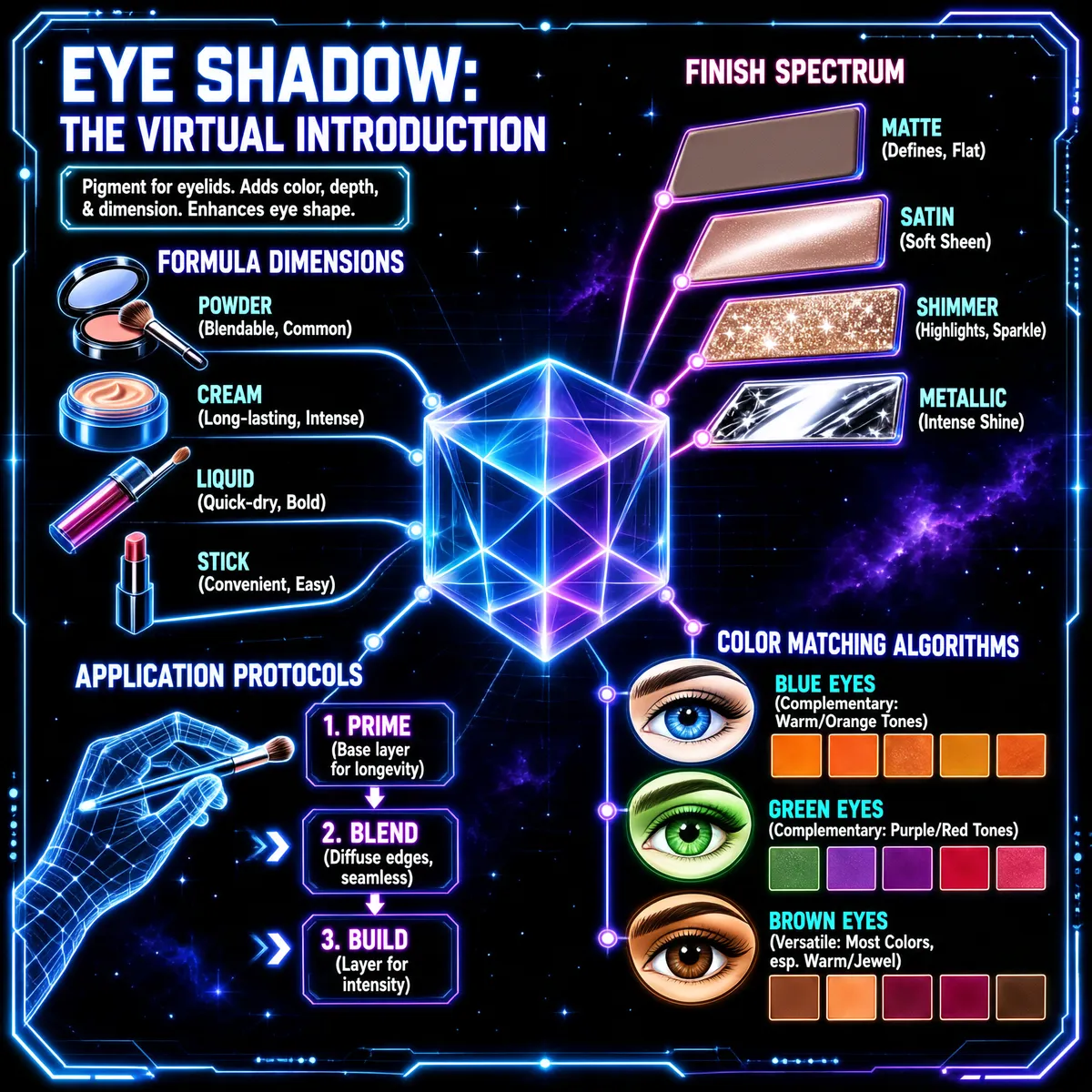
The infographic, titled "EYE SHADOW: THE VIRTUAL INTRODUCTION," presents a comprehensive guide to eye shadow in a high-tech, sci-fi aesthetic. Set against a dark, starry space backdrop with nebulae and glowing grid lines, the design employs neon blue, purple, and pink outlines to create a holographic, digital interface feel. The layout is structured around a central, translucent, multi-faceted cube that acts as a visual anchor, from which four main thematic branches radiate outward: Formula Dimensions, Finish Spectrum, Application Protocols, and Color Matching Algorithms. At the top left, under the title, a definition box states: "Pigment for eyelids. Adds color, depth, & dimension. Enhances eye shape." This introduces the core purpose of eye shadow. **Formula Dimensions** (top-left quadrant) displays five different physical forms of eye shadow, each with an icon and description: - **POWDER**: Icon shows an open compact with a brush; text: "(Blendable, Common)" - **CREAM**: Icon shows a jar with a swirled product; text: "(Long-lasting, Intense)" - **LIQUID**: Icon shows a tube and applicator; text: "(Quick-dry, Bold)" - **STICK**: Icon shows a lipstick-style stick; text: "(Convenient, Easy)" These are arranged along a curved, glowing path leading toward the central cube. **Finish Spectrum** (top-right quadrant) illustrates four texture finishes using rectangular bars with distinct surface textures: - **MATTE**: Flat, non-reflective bar; text: "(Defines, Flat)" - **SATIN**: Slightly reflective bar; text: "(Soft Sheen)" - **SHIMMER**: Glittery, sparkly bar; text: "(Highlights, Sparkle)" - **METALLIC**: Highly reflective, mirror-like bar; text: "(Intense Shine)" These bars fan out from the central cube, visually representing a spectrum of finishes. **Application Protocols** (bottom-left quadrant) details a three-step process, illustrated with a wireframe hand interacting with a glowing interface and a makeup brush: 1. **PRIME**: Text: "(Base layer for longevity)" 2. **BLEND**: Text: "(Diffuse edges, seamless)" 3. **BUILD**: Text: "(Layer for intensity)" Arrows connect these steps, indicating a sequential workflow. **Color Matching Algorithms** (bottom-right quadrant) provides guidance on selecting colors based on eye color, featuring stylized eyes and corresponding color palettes: - **BLUE EYES**: Icon of a blue eye; palette includes warm/orange tones; text: "(Complementary: Warm/Orange Tones)" - **GREEN EYES**: Icon of a green eye; palette includes purple/red tones; text: "(Complementary: Purple/Red Tones)" - **BROWN EYES**: Icon of a brown eye; palette includes various warm/jewel tones; text: "(Versatile: Most Colors, esp. Warm/Jewel)" Each eye color section has a row of colored squares representing recommended shades. The entire infographic is framed by a glowing, angular border, reinforcing the virtual, digital theme. All text is rendered in a clean, sans-serif font with a neon glow effect, enhancing readability and stylistic cohesion. The use of light trails, particle effects, and 3D elements creates a dynamic, immersive experience, making the technical information appear both modern and accessible.
More Images