Generate
Create images with AI
Math Exam Screen Share on Whiteboard
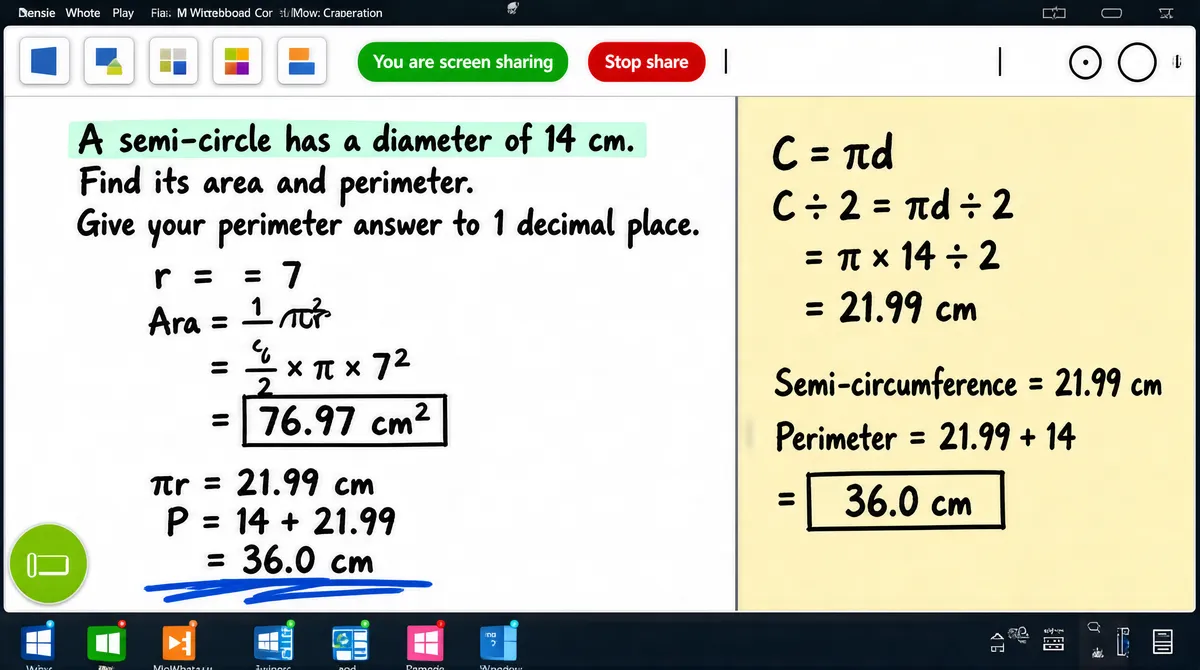
[Format] Landscape 16:9 gig cover rendered as a screen capture: a near-full-frame application window on a dark desktop, with a thin Microsoft Whiteboard tab strip above and a Windows taskbar below. Flat UI, crisp pixel edges, slight photographic realism of a real monitor capture. No watermark, no personal names. [Layout] A maximised light-grey application window fills almost the whole frame, inset a few pixels from all four edges. Inside it a slim white toolbar runs across the top, with a row of small rounded grey chips and, left of centre, a green pill reading "You are screen sharing" beside a red pill reading "Stop share". The window body is split into two panes, a white workspace taking the left two-thirds and a pale yellow note pane the right third, divided by one vertical edge. A thin strip of desktop shows at the very top with a faint menu bar, and at the very bottom a Windows taskbar of tiny app squares sits in front of the window, overlapping its lower edge. A small round dark tool button is pinned at the lower-left corner of the workspace. [Subject] None. Screen capture only, no person anywhere. [Headline] Handwriting is the only type. In the upper left of the white pane, black marker-style capitals pose a short exam question about a semi-circle, its area and a perimeter answer to one decimal place. Below it, large dark algebraic working in the same hand runs down the left with fractions, a square-root sign and two boxed numeric answers, underlined by a blue scribble. On the yellow pane at the right, more handwriting in the same black hand: a circumference equals pi times d over two formula, a numeric substitution, a semi-circumference line and two boxed perimeter results. A pale mint highlight strip sits behind the first line of the question text. All copy is a generic maths exercise. [Badges] Microsoft Whiteboard chrome shared through a Microsoft Teams meeting: about eight small flat rounded-square icon chips in grey and white across the Whiteboard toolbar, the green "You are screen sharing" pill with the red "Stop share" pill beside it, a thin vertical separator and small circles at the far right, plus about ten tiny flat app icons along the Windows taskbar in blue, green, orange, pink and grey with small coloured dot indicators. One lime-green circular badge with a blank white glyph sits at the window lower-left. [Mood] Cool near-white UI with a warm cream note pane and small saturated accent dots. Clinical and workmanlike, unmistakably a screen share, with the huge handwritten equations on white and yellow the strongest read at thumbnail size.
Tags
More Images