Generate
Create images with AI
Hype Video Editing Gig Cover
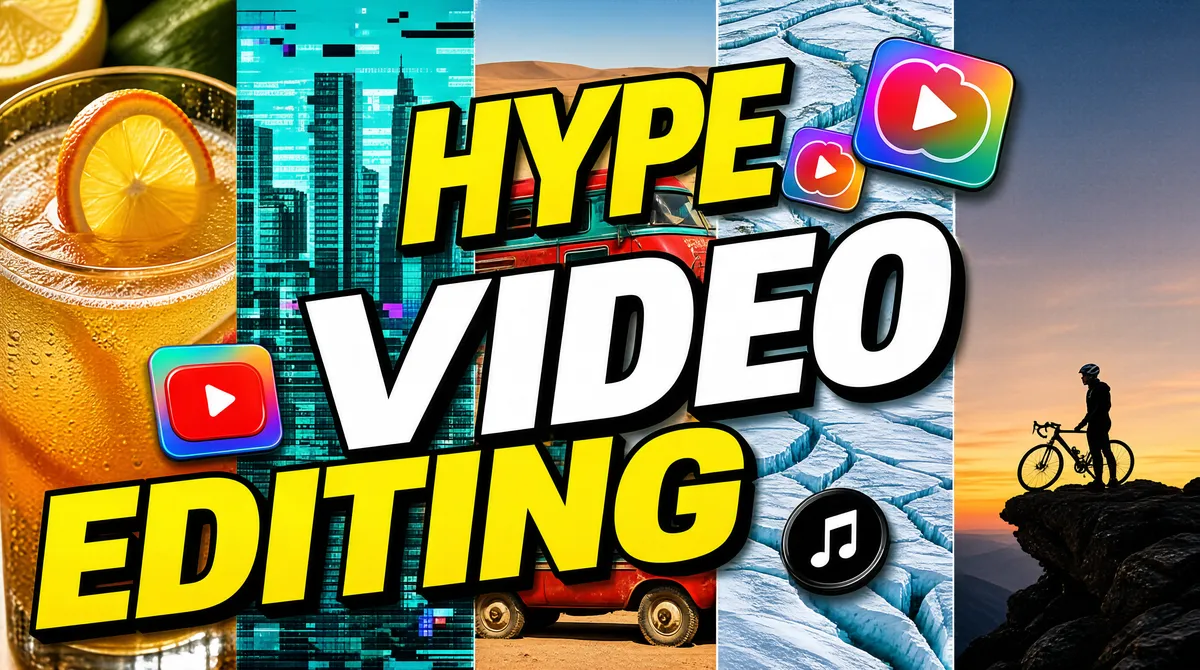
[Format] Landscape 16:9 gig cover, a five-column vertical photo-strip collage with giant stacked headline type exploding across the center and platform icons tucked between the words. Glitchy high-contrast finish. No watermark, no personal names. [Layout] The background is five full-height vertical photo strips of equal width, edge to edge, left to right: a golden cocktail close-up with citrus; a teal city skyline with glitch pixelation; a red-and-teal vintage van in a desert; a snowy glacier aerial; a lone cyclist standing on a rocky outcrop at dusk. Over the center, three enormous stacked headline words step diagonally from upper-center to lower-left, each word overlapping the strips. Floating among and behind the letters are four glossy platform icons at different depths — one top-center-right, one mid-left, one mid-right, one lower-right — partially occluded by the type, creating a layered collage feel. [Subject] None — no person in focus; tiny figures appear only inside the strips (the cyclist, van). [Headline] Three stacked words with hard black outlines and drop shadows: "HYPE" in yellow caps at top, "VIDEO" in white caps at center (largest), "EDITING" in yellow caps below, each line about 70-85% of frame width, stepping down and left. [Badges] Four glossy platform icons woven between the words: the YouTube mark (a red rounded-rectangle play-button tile), two Instagram marks (gradient camera-app tiles) and the TikTok mark (a black circular music-note tile). [Mood] Saturated yellow/teal/red strip mix with chunky outlined type — hype-edit montage energy, busy but readable. At thumbnail size the yellow-white-yellow word stack dominates the strips.
Tags
More Images